Showing posts with label Coding. Show all posts
Showing posts with label Coding. Show all posts
Tuesday, March 25, 2014
Monday, March 24, 2014
Baseball Scorecard, At-Bat Box in HTML5 Canvas - part 2
Blogger's Compose Interface creates issues with all the scorecards for Blogger that I have built.
The Compose Interface is the place where bloggers compose their writing (or score baseball games). It is equipped with all kinds of html shortcuts that write html for you via javascript enabled buttons along the top of the Compose window - just like your Email Compose Box.
When I create the markup for the baseball scorecards in a text editor - and then view the results in my browser - the results are radically different when I then take that code and paste it into the Blogger Compose widow set to 'HTML' - and then switch over to Compose mode tab. And then differently again when I publish it and look at the result on the Blog.
In this version of the html baseball scorecard for Blogger - which I guess I'll call the "Canvas Series" (ending the "Minima Series") - the Javascrpt that creates the box outline; the separation between the pitching notation area and scoring notation area; and the infield and outfield icons - are all produced via script - and that doesn't render in Bloggers Compose Interface at all!
That's why I added dashed lines to the text boxes - so I can see which quaderant I'm going to write in, and on which line in that quadrant.
Here's an image I took of what I see in the Blogger Compose Interface, that you see rendered just above as a baseball scorecard 'At-Bat box'.
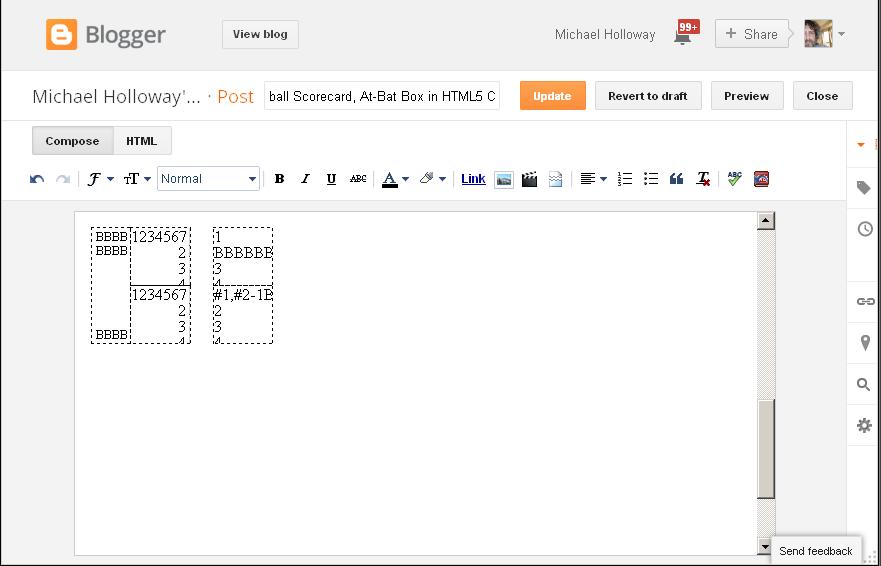
The next step in this Canvas Baseball Scorecard is to get the colour coding going. I've never seen the coding that makes the Compose shortcuts go ... I'm wondering if I can create some javascript that will allow me to use the text background colour pallet in the Compose Interface to colour code around the infield icon to indicate the progress of a base runner.
Next post is an experiment to see if I can get one javascript 'ChangeStyle' function to render one colour change in a background area in the Compose Interface box.
mh
The Compose Interface is the place where bloggers compose their writing (or score baseball games). It is equipped with all kinds of html shortcuts that write html for you via javascript enabled buttons along the top of the Compose window - just like your Email Compose Box.
When I create the markup for the baseball scorecards in a text editor - and then view the results in my browser - the results are radically different when I then take that code and paste it into the Blogger Compose widow set to 'HTML' - and then switch over to Compose mode tab. And then differently again when I publish it and look at the result on the Blog.
In this version of the html baseball scorecard for Blogger - which I guess I'll call the "Canvas Series" (ending the "Minima Series") - the Javascrpt that creates the box outline; the separation between the pitching notation area and scoring notation area; and the infield and outfield icons - are all produced via script - and that doesn't render in Bloggers Compose Interface at all!
BBBB
BBBB
BBBB
BBBB
BBBB
That's why I added dashed lines to the text boxes - so I can see which quaderant I'm going to write in, and on which line in that quadrant.
Here's an image I took of what I see in the Blogger Compose Interface, that you see rendered just above as a baseball scorecard 'At-Bat box'.
The next step in this Canvas Baseball Scorecard is to get the colour coding going. I've never seen the coding that makes the Compose shortcuts go ... I'm wondering if I can create some javascript that will allow me to use the text background colour pallet in the Compose Interface to colour code around the infield icon to indicate the progress of a base runner.
Next post is an experiment to see if I can get one javascript 'ChangeStyle' function to render one colour change in a background area in the Compose Interface box.
mh


Thursday, January 23, 2014
Wednesday, December 19, 2012
Friday, December 14, 2012
HTML - background colour change in a sized box using the "span" tag in Blogger
In my opinion Blogger has taken a step backward with the new Blogger Interface - but then my vision of what a blogging interface could be, might be different than those at Blogger. The new interface for example, will not accept CSS; and because all the Blogger Interface widgets run on JavaScript, it can't - and never could - employ user generated, JavaScript, Interface-level creative tools.
Since Firefox launched it's 4.0 Browser - changes to background colour in Blogger have been executed with-in the "span" tag. Before this the 'Text background color' widget in the Blogger Compose interface would change any "background-color;" - inside any tag. Now the widget only works with-in "span" tags --- and "span" tags are very limited as to what attributes they work with.
My goal today was to change the background colour of a box in Blogger with the existing "Text background color" widget - and I'm happy to announce, I've succeeded! :)
This coding will be incorporated into the Blogger Baseball Scorecard coding - so I can use colour notations in any browser when scoring games.
I'm hoping Blogger will institute a 'background area colour change' capability some day - for those of us who want to create more than just words with html in the Blogger Interface. The html5 "canvass" tag holds promise here - but html5 as a popular coding tool is still a few years away I think. Blogger can't support html5 canvass applications in the "Compose" interface because of JavaScript conflicts.
In my opinion Blogger has taken a step backward with the new Blogger Interface - but then my vision of what a blogging interface could be, might be different than those at Blogger. The new interface for example, will not accept CSS, and because all the Blogger Interface widgets run on JavaScript, it can't - and never could - employ user generated, JavaScript, Interface-level creative tools.
"Span" is 'different' than other tags. W3C calls "span", a "generic container", or more specifically, an "inline level generic container".(W3C | "Generic containers - the div and span elements" | http://www.w3.org/wiki/Generic_containers_-_the_div_and_span_elements)
By playing around with it in Blogger tonight I have discovered that "span" will take attributes other than just "background-color" - it also allows other text related attributes - like "font-size", "line-height" and "margin".
Weird thing about "span" - each tag allows only one attribute (Inside Blogger), and then a closing tag after the content. To add more attributes to the same content one must add another "span" tag before the content, with a different attribute, and then a second closing tag at the end of the statement. One may not span other statements tagged with anything other than a span tag.
In this example the "background-color" is "white". I have coded four "span" tag elements in a row - holding colour, line-height, font-size and margin - followed by four blank spaces, and then four closing "span" tags.
The box is a "div" container around four "span" tags that render four 100px high, blank spaces - background coloured "white". With this coding I can change the colour of the area inside the box with the "Text background color" widget in Blogger's "Compose" interface. This is accomplished with three clicks: high-light the area inside the box (left-click and drag); click on the "Text background color" button; select a colour from the pallet. (See four coloured examples below.)
And though an accident I also discovered an obvious truth, one can colour each character in the same word a different colour. So in this coding the browser renders a specific, changeable colour in an empty box. In this example the font-size and the line-height are both set to 100px, and the text that I'm background colouring are blank spaces - so in this case with a box of this size, you can colour a box as many as four different colours!
There is no limit to the size that you can set the "font-size" and "line-height" to - so any sized box you like. By increasing the font-size and line-height (only bigger than the container size), one can make the 'swaths' of colour wider and narrower. By adjusting "margin" you can move them left and right.
Correction: Apparently I can add multiple attributes per "span" tag, and close "span" tags in-line --- as in the example above (highlight, view selection source).
mh
Saturday, December 10, 2011
Minima IV Online Baseball Scorecard - Colour Menu on Top
Originally published at Blogger Baseball Scorecard - http://internetbaseballscorecard.blogspot.com/2011/12/minima-iv-colour-menu-on-top.html.
Cross posted at Michael Holloway's Baseball Blogs - http://baseball---blog.blogspot.com/2011/12/minima-iv-online-baseball-scorecard.html.
This is a new "Minima IV" at-bat box design which renders four Colour Notations Scoring Menus along the right side of the At-Bat box --- instead of in four pop-up menu, as in my last post on this latest version in the Internet Baseball Scorecard.
( http://internetbaseballscorecard.blogspot.com/2011/12/minima-iv.html )
The colour notation 'Selection Menus' open by clicking on the appropriate 'base' icon. When you click on the First Base icon ( the furthest right black triangle on the peach coloured, infield icon ), the First Base menu opens, indicated by the 1 in the bottom white box. In this coding the colour notation menu remains live until you choose another menu by clicking on a different Base icon. Click on any of the colours in the menu and an appropriately coloured triangle will appear on the chosen side of the infield.
In My scorekeeping universe: red means Out, pink means Error, yellow means Fielder's Choice, lime green means Base Hit, forest green means the runner advanced via ball put into play by another batter, blue means Stolen Base, navy blue indicates the route by which a Run was scored and RBI awarded. The bottom two boxes are field green and white - for fixing mistakes.
The Miima IV At-Bat (AB) box is less than half the size of the "Minima III" baseball scorecard AB box - but it has many hidden functions that provide for lots of customization for the individual user. Each quadrant of the AB box has text areas for recording scorekeeper notations - five lines high that allow for "Project Scoresheet" scoring notation protocols - but instead of room for 13 characters as in the Minima III scorecard, there are 7 in this sleek version. All text areas have hidden scroll bars which allow for any amount of text - but to keep the look of the card clean, I suggest limiting your notations to 5 lines. By clicking the button a "notepad" is available for any extra notations you wish, or for notes. The notepad closes by clicking on the "notepad" button again.
All the elements discussed above are Live in this example:
Cross posted at Michael Holloway's Baseball Blogs - http://baseball---blog.blogspot.com/2011/12/minima-iv-online-baseball-scorecard.html.
This is a new "Minima IV" at-bat box design which renders four Colour Notations Scoring Menus along the right side of the At-Bat box --- instead of in four pop-up menu, as in my last post on this latest version in the Internet Baseball Scorecard.
( http://internetbaseballscorecard.blogspot.com/2011/12/minima-iv.html )
 |
| 'Minima IV' AB box Image - rendered in Google Chrome |
In My scorekeeping universe: red means Out, pink means Error, yellow means Fielder's Choice, lime green means Base Hit, forest green means the runner advanced via ball put into play by another batter, blue means Stolen Base, navy blue indicates the route by which a Run was scored and RBI awarded. The bottom two boxes are field green and white - for fixing mistakes.
The Miima IV At-Bat (AB) box is less than half the size of the "Minima III" baseball scorecard AB box - but it has many hidden functions that provide for lots of customization for the individual user. Each quadrant of the AB box has text areas for recording scorekeeper notations - five lines high that allow for "Project Scoresheet" scoring notation protocols - but instead of room for 13 characters as in the Minima III scorecard, there are 7 in this sleek version. All text areas have hidden scroll bars which allow for any amount of text - but to keep the look of the card clean, I suggest limiting your notations to 5 lines. By clicking the button a "notepad" is available for any extra notations you wish, or for notes. The notepad closes by clicking on the "notepad" button again.
All the elements discussed above are Live in this example:
notes:

Tuesday, March 8, 2011
How the new "2011 Blogger Baseball Scorecard" works
(This piece was simultaneously published at "Michael Holloway's Baseball Blogs".)
Microsoft's Internet Explorer browser won't show certain properties of border tags which make up the diamond shape of the 'At Bat' boxes that are at the centre of the new 2011 Blogger Baseball Scorecard's design.
The two images below (side by side) show Microsoft's Internet Explorer's rendering of my code:
Below are images as above, from the same web page, this one rendered by Firefox 3.6.15 browser:
The code has been validated at W3C as HTML 4.01 Transitional - Passed. I'm working on finding out why Internet Explorer won't render the border tags properly, and fixing it. In the meantime if you want to read this years scorecards, you'll have to do it with a different browser.
Firefox browser is available here. I have found that I can have more than one browser on my Windows XP Operating System. In my experience even running both at the same time doesn't compromise performance on my machine.
On Sunday March 6th, I used the new scorecard to score-keep the Toronto Blue Jays at Pittsburgh Pirates spring training game in Bradenton Florida, which was on Rogers SNET-1 in this market. You can see it here - if you must, it's an awful mess of scoring. As I say at the Internet Baseball Scorecard Blog, "This is the new, never before used in-game, 2011 Internet Baseball Scorecard - bear with me." I scored all the runs, but missed a lot of outs, and substitutions and even the staring line-ups were incomplete - etc., etc., etc.. But you can see that it functions as it's supposed to. So far, I'm really happy with it.
How it Works

Above is an example of a border tag used to make a simple two tone border - note the angles at the corners. In the scorecard, each quadrant of the diamond is actually the corner of a border (see Figure 1.) - it's the only way to make an angle with HTML!
At the top of this post - in the Firefox Browser Rendering, 2 image set - the left image has all four of the vertical border lines set to "solid black" - and the horizontal border lines set to match the background colour, thus they are invisible. In the image right next to that, the four horizontal border colours are set to a slightly darker colour than the background - so the appearance is of a frame around a diamond.
A scorekeeper can change the horizontal border's colour attributes on the fly, using the Blogger Compose mode "Text background color" widget. By selecting one of the four horizontal borders in each AB box, and changing it's colour with the "Text background color" button, one can indicate the progress of a runner around the bases:

The first box on the left, is how all the boxes in the entire scorecard appear before the game starts. The next box shows a runner on First Base, next one on Second Base, and so on. A solitary black diamond indicates a Run Scored - just like in pencil and paper scoring! :)
How to score with it
To change the attributes of the borders that make up the black diamond while scoring a baseball game is easy. Below I've taken a screen shot of me about to change the colour of the south-east quadrant - in order to indicate a runner is on First Base The colour indicated in the palette is the slightly darker peach. I'm about to change the colour of the horizontal border to the colour right above the one indicated - to the same colour as the background of the quadrant box:

First you highlight the border attribute by left clicking beside the diamond in the quadrant you wish to change. Next, left click on the "Text background color" button and choose the colour you want.
And Viola, a runner is on First Base:

Specifications
 I think there's more than enough space in the 2011 Blogger Baseball Scorecard to score the game with any iconography you wish to invent.
Below (or above) each angle of the diamond there are four lines for text, room for 10 uppercase letters or 12 lower case letters on each line.
In the Pitches column there is again, more than enough room for the number of pitches in the best plate appearance (a great plate appearance is around 12 pitches).
Modern Project Scoresheet defensive notations and ball trajectory notations can be noted in the Pitches column as well.
Also note that if you have to, you can keep on writing outside of any of the boxes - the letters render where you put them - by hitting return you can create a block of script that extends into the next inning's AB box (which usually remains empty - unless the team bats around).
In a few days I will finish the new 2011 Blogger Baseball Scorecard. It still needs Per-Inning totals boxes; Pitchers Totals boxes and a Per-Inning Box Score table for across the top. When all that is done I will post the code for the 2011 Blogger Baseball Scorecard to a Google Document and you can run it in a special extra-wide Blogger blog.
The Extra-wide Blogger code is available below:
To read an overview of how to install this code into a Blogger Blog go to, "2011 Scorecard: Bigger! Better!"
(Note the "2011 Scorecard Bigger! Better!" is an article about a simpler version I used in the 2010 MLB Postseason - it doesn't have the diamond feature - but the width of the blog you'll need for this, new version is the same.)
mh
Microsoft's Internet Explorer browser won't show certain properties of border tags which make up the diamond shape of the 'At Bat' boxes that are at the centre of the new 2011 Blogger Baseball Scorecard's design.
The two images below (side by side) show Microsoft's Internet Explorer's rendering of my code:
 |
| Internet Explorer Rendering |
Below are images as above, from the same web page, this one rendered by Firefox 3.6.15 browser:
|
| Firefox Browser Rendering |
The code has been validated at W3C as HTML 4.01 Transitional - Passed. I'm working on finding out why Internet Explorer won't render the border tags properly, and fixing it. In the meantime if you want to read this years scorecards, you'll have to do it with a different browser.Firefox browser is available here. I have found that I can have more than one browser on my Windows XP Operating System. In my experience even running both at the same time doesn't compromise performance on my machine.
On Sunday March 6th, I used the new scorecard to score-keep the Toronto Blue Jays at Pittsburgh Pirates spring training game in Bradenton Florida, which was on Rogers SNET-1 in this market. You can see it here - if you must, it's an awful mess of scoring. As I say at the Internet Baseball Scorecard Blog, "This is the new, never before used in-game, 2011 Internet Baseball Scorecard - bear with me." I scored all the runs, but missed a lot of outs, and substitutions and even the staring line-ups were incomplete - etc., etc., etc.. But you can see that it functions as it's supposed to. So far, I'm really happy with it.
How it Works

| (Border: 30px height: 90px width: 260px) |
Above is an example of a border tag used to make a simple two tone border - note the angles at the corners. In the scorecard, each quadrant of the diamond is actually the corner of a border (see Figure 1.) - it's the only way to make an angle with HTML!
At the top of this post - in the Firefox Browser Rendering, 2 image set - the left image has all four of the vertical border lines set to "solid black" - and the horizontal border lines set to match the background colour, thus they are invisible. In the image right next to that, the four horizontal border colours are set to a slightly darker colour than the background - so the appearance is of a frame around a diamond.
A scorekeeper can change the horizontal border's colour attributes on the fly, using the Blogger Compose mode "Text background color" widget. By selecting one of the four horizontal borders in each AB box, and changing it's colour with the "Text background color" button, one can indicate the progress of a runner around the bases:
The first box on the left, is how all the boxes in the entire scorecard appear before the game starts. The next box shows a runner on First Base, next one on Second Base, and so on. A solitary black diamond indicates a Run Scored - just like in pencil and paper scoring! :)
How to score with it
To change the attributes of the borders that make up the black diamond while scoring a baseball game is easy. Below I've taken a screen shot of me about to change the colour of the south-east quadrant - in order to indicate a runner is on First Base The colour indicated in the palette is the slightly darker peach. I'm about to change the colour of the horizontal border to the colour right above the one indicated - to the same colour as the background of the quadrant box:

First you highlight the border attribute by left clicking beside the diamond in the quadrant you wish to change. Next, left click on the "Text background color" button and choose the colour you want.
And Viola, a runner is on First Base:

Specifications

Below (or above) each angle of the diamond there are four lines for text, room for 10 uppercase letters or 12 lower case letters on each line.
In the Pitches column there is again, more than enough room for the number of pitches in the best plate appearance (a great plate appearance is around 12 pitches).
Modern Project Scoresheet defensive notations and ball trajectory notations can be noted in the Pitches column as well.
Also note that if you have to, you can keep on writing outside of any of the boxes - the letters render where you put them - by hitting return you can create a block of script that extends into the next inning's AB box (which usually remains empty - unless the team bats around).
In a few days I will finish the new 2011 Blogger Baseball Scorecard. It still needs Per-Inning totals boxes; Pitchers Totals boxes and a Per-Inning Box Score table for across the top. When all that is done I will post the code for the 2011 Blogger Baseball Scorecard to a Google Document and you can run it in a special extra-wide Blogger blog.
The Extra-wide Blogger code is available below:
Blogger Code to make your Blog Wider
(to view the code, right click over the frame, highlight "This Frame")To read an overview of how to install this code into a Blogger Blog go to, "2011 Scorecard: Bigger! Better!"
(Note the "2011 Scorecard Bigger! Better!" is an article about a simpler version I used in the 2010 MLB Postseason - it doesn't have the diamond feature - but the width of the blog you'll need for this, new version is the same.)
mh
Subscribe to:
Posts (Atom)